
Managing Networking Settings
Networking settings are very simple and can be managed in Networking > Basics:
Settings
- Contact List - Show or hide the My Contacts screen
- Directory - Show or hide the attendee directory. Note that the options are All or Recommended, where recommended is a subset of attendees that are recommended based on attendee data.
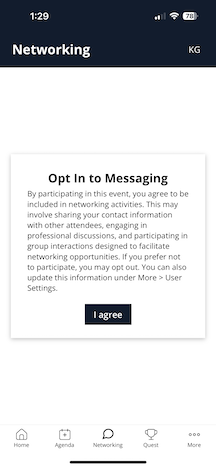
- Require Opt In - Uses the opt in text below (which can include your terms and conditions) to force each attendee to opt into networking, chat, and meetings, or not.
- Once opted in, attendees can opt out of meetings separately from More > Settings > My Info, if desired. We do not have a separate opt out for chat only.
- The text can be customized.
- Enable Meetings - if meetings are enabled, attendees will have a Book Meeting button on their profile. Meeting invitations can be sent from one attendee to another, and any accepted meeting will show on the attendee agenda.
- Note that meetings require public spaces to be set up in Settings > Rooms.
Networking Screens
Directory: Shows all registered attendees. Search and scroll to find attendees to connect with.

Contact Profile: Any contact that you scan onsite or star their profile will show in My Contacts so you can easily find them, chat or book a meeting.

Chat: Chat with one or many attendees on the profile or in messages.

Did this answer your question?